About Us

Users can now request their Philippine Statistics Authority (PSA) birth certificate directly inside the GCash app through its GLife, following the integration of PSAHelpline into the platform.
Through the new feature, fully verified users can access official civil registry documents issued by the Philippine Statistics Authority without going to a PSA branch or using a separate website.
After opening the GCash app, users can tap on GLife, search for PSAHelpline under Government Services, and proceed with their request by selecting the document type, such as a birth certificate.
Users need to enter the required personal details, choose between a digital PDF copy or physical delivery, review the corresponding fees, and complete the payment using their GCash wallet.
LIST OF PSA DOCUMENT AVAILABLE
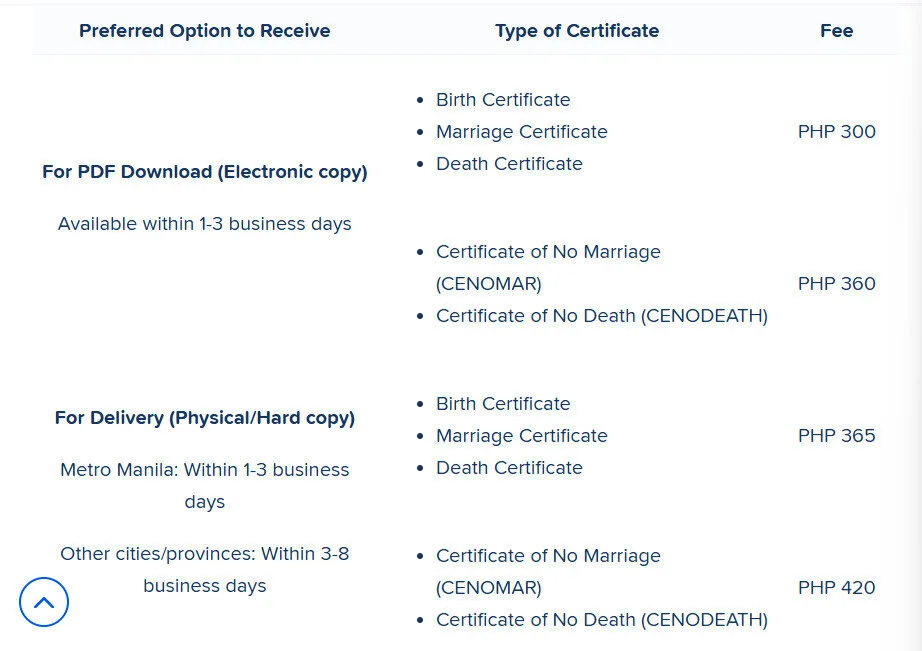
Once the transaction is confirmed, order updates are sent via SMS and email. Processing times vary depending on the selected document and delivery option.
The service is available only to fully verified GCash users, and account details such as name and date of birth must match official records to avoid delays.
By embedding PSA document requests into a widely used mobile wallet, GCash expands its role beyond digital payments, bringing essential government services closer to everyday mobile users and reducing the need for in-person transactions.